

Beta · open source · Apache-2.0
An open-source panel for selling and running virtual servers
Lightning VM is a panel you install on your own server to sell and manage servers on VMware, Proxmox VE, XCP-ng, oVirt, Hyper-V, KVM and Incus / LXD. Your customers order servers, power them on and off and reinstall them; you manage capacity, IP addresses, prices and notifications from the same panel.
It is open source and free of charge: licensed under Apache-2.0, with a public repository and no paid edition. The project is in beta; it has not reached a full release.
Install with one command
curl -fsSL https://lightningvm.app/install.sh | sudo sh
# without a domain: https://<ip>.sslip.io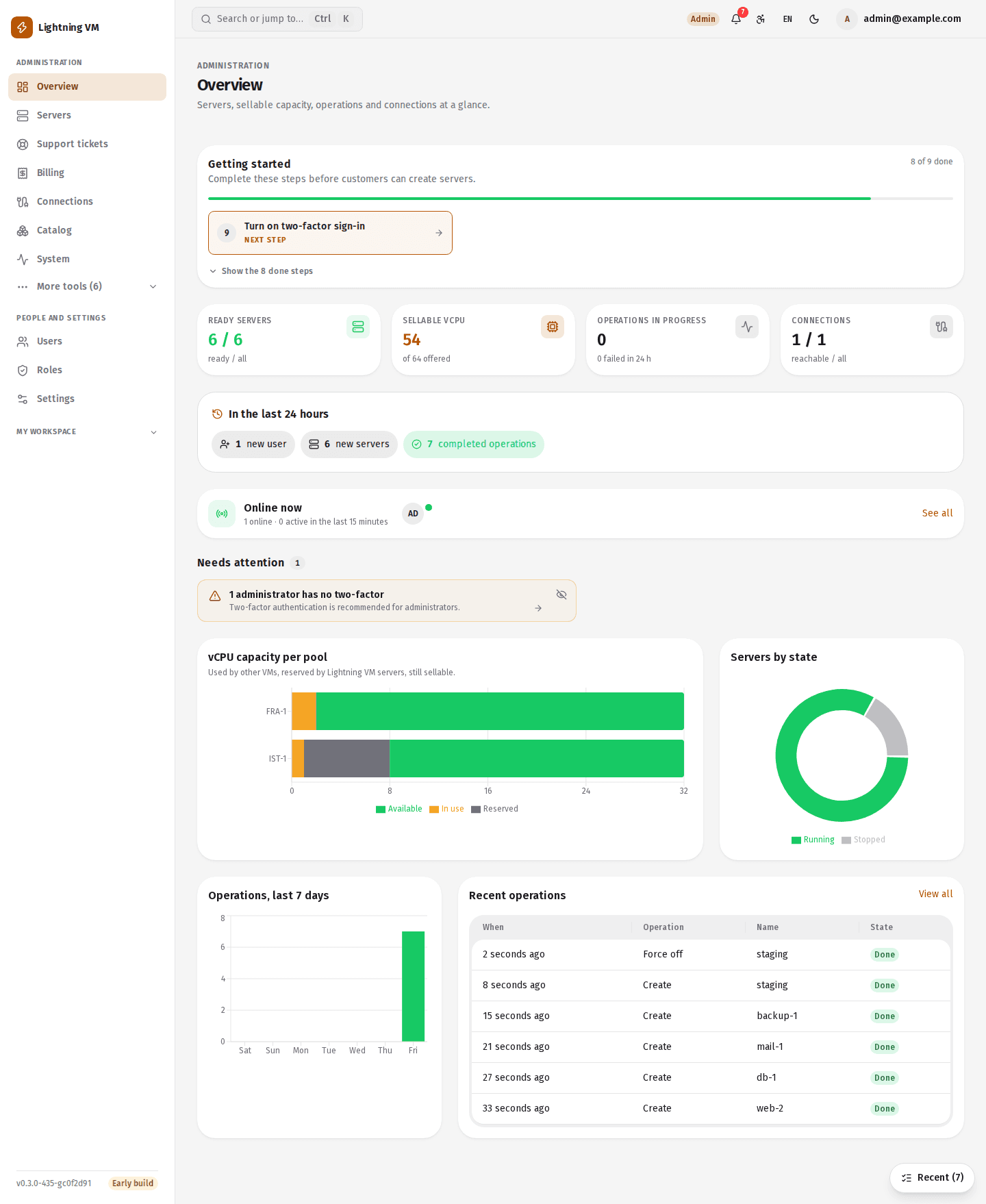
Supported virtualisation platforms
- VMware vSphereFull coverage
- Proxmox VE
- XCP-ng / XenServer
- oVirt / RHV
- Microsoft Hyper-V
- KVM (libvirt)
- Incus / LXD
Only VMware has every feature. The other six platforms have server creation, power operations, resizing, snapshots and extra disks; those six adapters are first versions, and most have not been tried on real hardware. Platforms and coverage
Features
A customer panel and an admin panel
Customers manage their own servers; your team manages capacity, invoices and users. For most day-to-day work after installation you do not need to SSH into the panel's server. What follows is a summary; each area has its own page with the details.
Customer panel
Ordering
A package or custom resources; packages that do not fit are shown with the reason, the price updates as you choose, quota is checked, and the configuration has a shareable link.
Reinstall and resize
Another image with the same addresses and keys; a package or a custom size, with the difference billed pro rata by the day.
- VMware
Browser console
Open the server's screen in the browser, attach an ISO, reset the root password.
Snapshots and extra disks
Take a snapshot and go back to it; add disks; keep order with power schedules and tags.
- VMware
Backups and personal images
Restore from a backup; save a server as an image and order new servers from it.
- VMware · Proxmox
Traffic quota
Daily inbound and outbound counts with warnings at 80% and 100%; rate limiting once the quota is used up (VMware).
Command palette (Ctrl+K)
Search pages, servers, tickets and invoices; recently opened items and quick actions.
API and webhooks
API tokens and OpenAPI docs; webhooks that are signed, retried and logged per delivery.
- VMware
Firewall and private networks
Firewall templates, private networks, reverse DNS (PTR) and SSH key import from GitHub.
Admin panel
Capacity insights
Pools forecast to fill up, IPs running low, idle or undersized servers and stuck jobs in one list.
Roles and permissions
Permission-based roles, with role limits such as quota, session length, required two-factor and allowed IPs.
Abuse detection
Scans for risky open ports and flags suspected mining; unacknowledged findings are counted in the menu.
IP pools
IPv4 pools with an optional IPv6 prefix; locations, resource pools and overcommit ratios.
Adopting VMs
Turn a VM created outside the panel into a customer's server while it keeps running.
- VMware
Migration and host evacuation
Move a running server to another host; move every server off a host before maintenance.
Billing and resellers
Coupons, hourly usage, Turkish e-invoicing (e-Fatura / e-Arşiv); card payments through iyzico, PayTR, Craftgate, Param and Stripe.
Notifications
In-panel, Web Push, e-mail, SMS and chat apps such as Telegram, Slack, Discord and Teams.
Directory and single sign-on
Passkeys, two-factor authentication, LDAP / Active Directory and single sign-on with OpenID Connect.
Features with a platform tag work only on those platforms.
Platform coverage
What works on which platform
All seven platforms speak the same adapter contract, but not all of them do everything. For an unsupported operation the panel answers “not supported on this platform”. A mark in the table means the code exists, not that it was tried on real hardware.
| Capability | VMware | Proxmox VE | XCP-ng | oVirt | Hyper-V | KVM | Incus / LXD |
|---|---|---|---|---|---|---|---|
| Discovery, capacity, topology | Yes | Yes | Yes | Yes | Yes | Yes | Yes |
| Create from template or image, reinstall | Yes | Yes | Yes | Yes | Yes | Partly | Yes |
| Power on, off, restart, delete | Yes | Yes | Yes | Yes | Yes | Yes | Yes |
| Resize | Yes | Yes | Partly | Yes | Partly | Partly | Partly |
| Snapshots and extra disks | Yes | Yes | Yes | Yes | Yes | Yes | Yes |
| Adopt an existing VM | Yes | Yes | Yes | Yes | Yes | Yes | Yes |
| Root password, app install (cloud-init) | Yes | Partly | Yes | Yes | Yes | Yes | Yes |
| Usage graphs | Yes | Yes | No | No | No | No | No |
| Traffic counting and quota warning | Yes | Yes | No | No | No | No | No |
| Browser console | Yes | No | No | No | No | No | No |
| Firewall and private networks | Yes | No | No | No | No | No | No |
| Backup and restore, personal images | Yes | No | No | No | No | No | No |
| Migration and host evacuation | Yes | No | No | No | No | No | No |
- Yes
- Partly / conditional
- No
- On KVM the host needs virt-clone and virt-xml.
- Partly: with the server powered off; the panel shuts it down and starts it again itself.
- On Proxmox these are applied through the QEMU guest agent.
Screenshots
Screenshots from the panel
These pictures are taken from the panel itself. The interface comes in Turkish and English, with a light and a dark theme.
The admin overview: first steps, sellable capacity, items that need attention and recent operations.
How it works
From installation to the first order
You install the panel, connect your virtualisation platform and prepare the catalog. Before you open it to real customers, run the whole flow end to end in your own environment.
- 1
Install
You run one command on a separate Ubuntu server. The script installs Docker if it is missing, starts the services and obtains an HTTPS certificate for your domain or for <ip>.sslip.io.
curl -fsSL https://lightningvm.app/install.sh | sudo sh - 2
Connect
Under Administration → Connections you add vCenter, Proxmox VE, XCP-ng, oVirt, Hyper-V, KVM or Incus. The panel discovers hosts, datastores, networks and existing VMs.
vcenter.example.local · pve01:8006 - 3
Sell
In the catalog you define locations, resource pools, IP pools, images and packages, and connect your payment provider. A customer orders, the panel builds the server and issues the invoice.
Package: 2 vCPU · 4 GB · 80 GB
Architecture
The parts of the panel
Caddy in front with automatic HTTPS; each platform is a separate service speaking the same adapter contract. Everything runs on one server with Docker Compose.
Web
Next.js 16 · React
Customer and admin panel
API
NestJS · Fastify
REST API, identity, settings, notifications
Worker
Node.js · BullMQ
Server operations, step by step and resumable
VMware service
Go · govmomi
The adapter that talks to vCenter / ESXi
Data
PostgreSQL · Redis
Persistent records and the job queue
The Proxmox, XCP-ng, oVirt, Hyper-V, KVM and Incus adapters are dependency-free Node.js services; a WebSocket gateway written in Go serves the browser console and the server terminal.
Articles
Worth reading before you install
What the installer puts on your server, how billing proceeds and what the security audit covered are each explained in an article of their own.
What the one-line install does and puts on your server
The script the install command downloads, what it does step by step, what it leaves alone, and what is on the server once it has finished.Read more →From the simulator to a real vCenter or Proxmox
Trying the panel with the simulator first, then connecting it to a real vCenter or Proxmox node: the order to do it in, what to watch for, and the risks the docs state openly.Read more →Billing periods, renewals and the review hold
The path a subscription takes from the order to renewal and from an unpaid invoice to suspension, and what waits while a payment is under review.Read more →
FAQ
Frequently asked questions
Does Lightning VM cost anything?
No. Lightning VM is open source and distributed under the Apache-2.0 licence. All of the source code is in the public repository on GitHub. There is no licence fee, no fee per server or per customer, and no paid edition. All the customer and admin features, the seven platform adapters, installation and updates are in that one repository.
What do I need to install it?
A separate Linux server running Ubuntu 22.04, 24.04 or 26.04 (amd64 or arm64), at least 2 GB RAM and 10 GB free disk, and ports 80 and 443 open to the outside. Recommended are 4 GB RAM and a domain whose A record points at the server. If Docker is not installed, the script installs it from its official repository.
Which virtualisation platforms does it support?
VMware vSphere (vCenter / ESXi 6.0 to 9.x), Proxmox VE 7.x to 9.x, XCP-ng 8.x, oVirt 4.4+, Hyper-V (Windows Server 2016+), a KVM host with libvirt, and Incus 6.x / LXD 5.x. Only VMware has every feature; what the others have is in the coverage table.
Have all these platforms been tried on real hardware?
No. The VMware side was tested mostly with the simulator. Incus was tried on a real Incus 6.0 server, with containers only. The Proxmox VE, XCP-ng, oVirt, Hyper-V and KVM adapters have never run on a real hypervisor; their tests run against mock servers that imitate the platform. Try your platform in your own test environment before production.
Can I bring my existing virtual machines into the panel?
Yes. You can adopt a VM created outside the panel as a customer's server while it keeps running. Adoption exists on all seven platforms.
Which payment providers can I collect payments with?
Card payments are collected only through iyzico, PayTR, Craftgate, Param and Stripe. For the other 41 providers in the settings only the account details are stored; no payment can be taken through them. None of the five was tried with a real merchant account; make one payment and one refund in test mode before going live.
What does beta mean here, and which version is this?
Lightning VM is in beta; it has not reached a full release (1.0). It is under active development and has not been validated on real hardware for every platform: the VMware side was tested mostly with the simulator, Incus was tried on a real server with containers only, and the Proxmox VE, XCP-ng, oVirt, Hyper-V and KVM adapters have never run on a real hypervisor. None of the five payment providers was tried with a real merchant account. Behaviour can change between versions; read upgrade-notes.md in the repository before upgrading.
Is it ready for production?
The README's own answer is cautious. The project is a development release and was written largely with AI (Claude Code). Every change went through unit, integration and end-to-end tests, but there may be bugs and security holes, and it has not had an independent security audit. Before you use it with real customers and real money, try it in your own environment, take backups and review the code.
How do I update the panel?
Under Administration → System → Updates, or with the command below. Every update takes a backup first; if the new version does not become ready, the containers go back to the previous version. The database is not rolled back automatically. Read upgrade-notes.md in the repository before upgrading.
sudo sh scripts/install.sh updateBeta · open source · Apache-2.0
Open source, free to use
Every feature of Lightning VM is in the public repository; there is no licence fee and no paid edition. The project is in beta: try it in your own environment before you use it with real customers. Questions and bug reports are welcome as issues on GitHub.