

Features
Ordering and catalog
How a customer orders a server and what you put on sale: resource pools, packages, custom-resource rules, images, locations, quotas and the virtual datacenter.
On this page
What the customer sees
On the New server page the customer picks a location, an image and a size. The size is either a ready-made package or, if you have defined a rule for that pool, custom resources where the customer sets vCPU, RAM and disk. The page recalculates the price on every change and checks the quota. Packages that do not fit the chosen location or image stay in the list, each with the reason it cannot be used. The panel also suggests the best-fitting package and a server name.
A configuration has a shareable link. The link carries only the location, image, package and billing period; the name, SSH key and password never go into it, and the values that arrive through a link are checked against the catalog again.
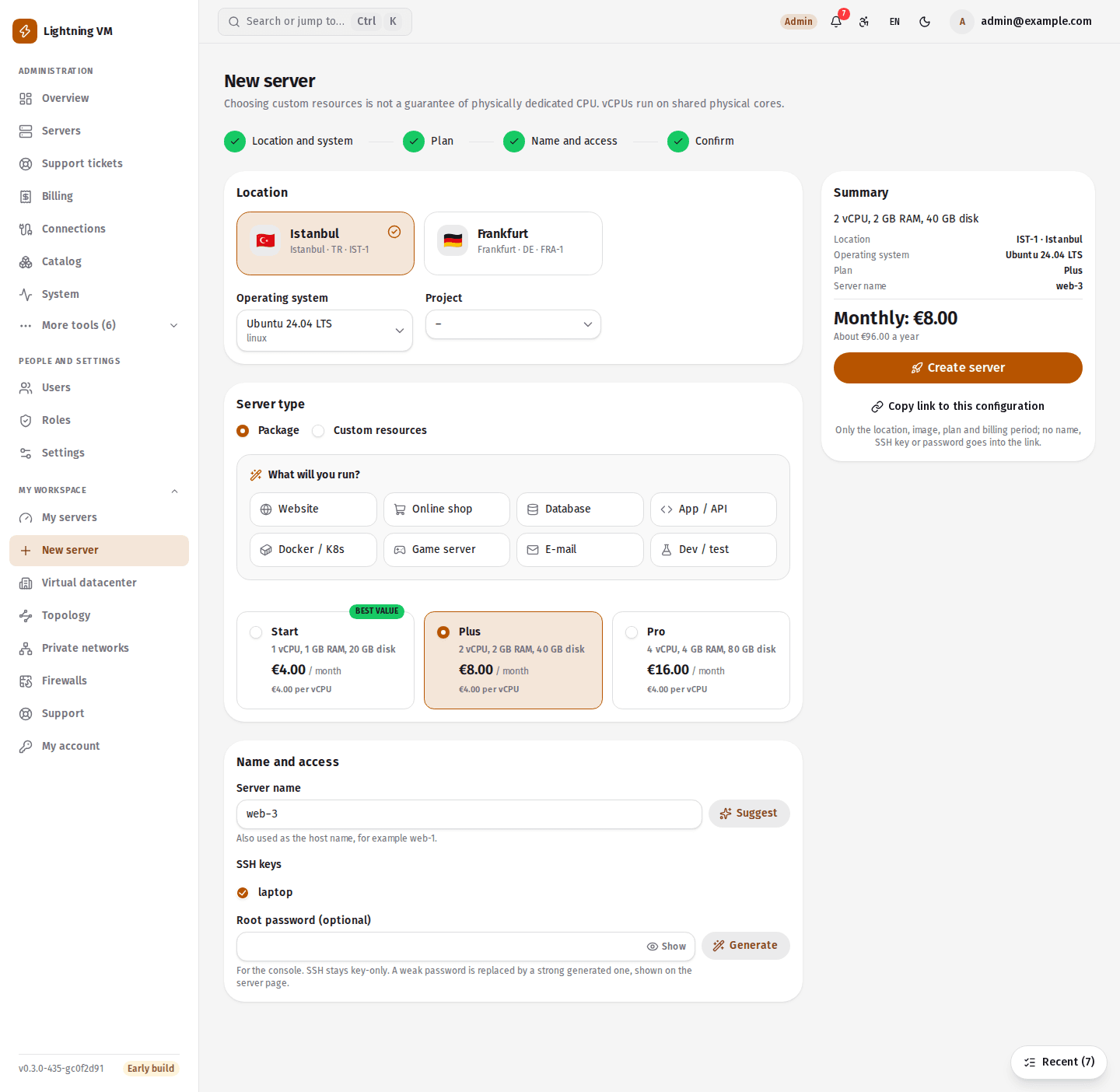
Choosing custom resources is not a guarantee of physically dedicated CPUs: vCPUs run on shared physical cores, and the order screen says so in plain words.
Resource pools
A resource pool creates no physical resources; it puts part of the capacity of a discovered connection on sale. A pool consists of a cluster or a single host, one or more datastores, a network, and an overcommit ratio per kind of resource. All of these must exist in the connection's discovered inventory.
The panel shows capacity in layers: physical total, management and safety reserve, opened for sale, reserved, actual use and what is left to sell.
| Resource | Overcommit ratio |
|---|---|
| CPU | 4x by default, 32x at most; kept apart from RAM and disk |
| RAM | 1x recommended, 4x at most |
| Storage | 1x–10x, assuming thin disks |
VMs created outside the panel use capacity too and are subtracted from what is left to sell. A pool shows a warning when the real free space falls below the safety reserve or when allocated space exceeds physical capacity.
Packages, images and locations
- Package: vCPU, RAM, disk, monthly price, an optional hourly price, currency, the pools it is offered in and the images it allows.
- Image: a VM template in the connection's inventory. You prepare the template on the platform side.
- Location: what the customer chooses when ordering. A location in maintenance mode takes no new servers.
- Custom-resource rule: at most one per pool. It sets minimum and maximum values and step sizes for vCPU, RAM and disk, the allowed range of RAM per vCPU, and the unit prices.
Amounts are stored as decimals (numeric) in the database, and prices are never calculated in floating point.
Quota and the virtual datacenter
A quota is a maximum number of servers and a maximum of vCPU, RAM and disk. If the user or the project has no quota of its own, the limit of the user's role applies. Quota and capacity are checked at the moment of the order, inside one short database transaction.
With a virtual datacenter (VDC) you allocate vCPU, RAM, disk and a maximum number of servers from a pool to one customer and set a monthly fee. The allocation is taken out of the pool's capacity at once. The customer creates servers of any size within what is left; those servers are not charged separately and do not count against the user's quota. A VDC that still contains servers cannot be deleted.
Limits
- To create servers, the location's connection must be able to clone from a template. On VMware that means vCenter; a standalone ESXi host offers only read and power operations.
- Additional IPv4 addresses can only be chosen while ordering; none can be added to a running server later.
- Customers created by an integration (WHMCS / WISECP) cannot order from the panel while the panel's own billing is switched off.
Install command
curl -fsSL https://lightningvm.app/install.sh | sudo shUbuntu 22.04 / 24.04 / 26.04. Requirements and options